Best AI Coding Agents 2026: Complete Comparison Guide
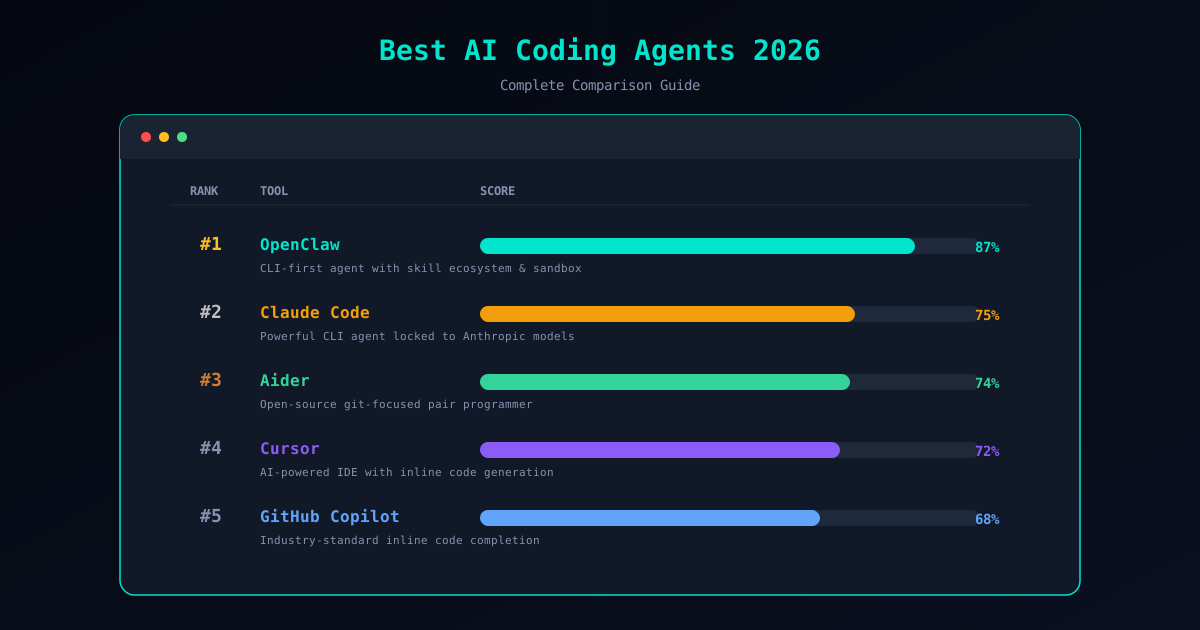
The AI coding agent landscape in 2026 looks nothing like it did two years ago. What started as autocomplete and chat assistants has evolved into autonomous agents that can plan multi-step tasks, execute shell commands, modify codebases, and deploy applications. The tools are more powerful, the stakes are higher, and the differences between them matter more than ever.
Choosing the wrong agent means wasted money, security risks, or a workflow that fights you instead of helping. This guide compares the 10 best AI coding agents available in 2026, ranked by the criteria that actually matter for professional development work. We tested each tool on real projects, evaluated their security models, measured their costs, and assessed their communities. No sponsored placements, no affiliate bias — just an honest ranking based on what works.
How We Evaluated
Every tool in this guide was evaluated against six criteria. Here is what each one means and why it matters.
Security. Does the agent sandbox its execution? Does it have a permission model? Can it access your filesystem, network, and credentials without asking? Security is weighted heavily because an agent with full system access is a liability, not a tool.
Cost. What does it actually cost to use the agent on a daily basis? We look at subscription fees, per-token API costs, and the hidden cost of token waste from inefficient architectures. A tool that burns $50 in tokens on a task that should cost $1 is not affordable regardless of its subscription price.
Reliability. Does the agent complete tasks consistently? Does it get stuck in loops, hallucinate file paths, or lose context mid-session? Reliability is measured by task completion rate on real-world coding scenarios, not benchmarks.
Extensibility. Can you add capabilities beyond what ships out of the box? Is there a plugin or skill ecosystem? Can you connect it to your own tools and services? An agent that only does what its creators built is limited by their imagination, not yours.
Community. Is the project actively maintained? Are issues addressed? Is there a community of users sharing knowledge, building extensions, and reporting problems? A tool with a dead community is a tool with a deadline.
Open source. Can you read the source code? Can you audit what the agent does with your data? Can you fork it if the project changes direction? Open source is not just a philosophical preference — it is a security and longevity guarantee.
The Best AI Coding Agents in 2026
1. OpenClaw — Best Overall
OpenClaw takes the top spot because it is the only agent that scores highly on every criterion. It is open source, CLI-first, and built on a skill-based architecture that lets you extend its capabilities through the ClawHub marketplace. The security model is the most comprehensive on this list: Docker-based sandboxing, a granular permission system covering file access, shell commands, and network requests, human-in-the-loop approval gates, and a verified skill catalog that is continuously audited for malicious behavior.
What makes OpenClaw particularly powerful is its multi-model support through Gateway. You are not locked into a single LLM provider. Connect it to Anthropic, OpenAI, Google, or any other provider — or run models locally with Ollama for zero API cost. This flexibility means you can optimize for cost, speed, or capability depending on the task, and you never face vendor lock-in.
The cost model is straightforward: you pay per API token, typically $0.10-2.00 per task depending on complexity and model choice. There is no subscription fee for the framework itself. The active open-source community contributes skills, reports security issues, and maintains documentation. If you want one agent that handles security, extensibility, and cost effectively, OpenClaw is it. For a deeper look at the framework, see our What is OpenClaw? guide.
2. Claude Code — Best for Anthropic Users
Claude Code is Anthropic’s official CLI agent, and it is excellent at what it does. It connects directly to Claude models and provides a terminal-based workflow for code generation, refactoring, debugging, and file manipulation. The tool understands large codebases, follows complex instructions, and produces high-quality output consistently.
The limitation is in the name: Claude Code only works with Claude models. There is no multi-model support, no skill marketplace, and no community-driven extensions. The security model relies on Anthropic’s built-in safety measures rather than user-configurable sandboxing and permission controls. You trust Anthropic to handle security rather than verifying it yourself.
For teams already committed to the Anthropic ecosystem, Claude Code is a strong choice. The model quality is exceptional, the CLI experience is polished, and the tool integrates well into terminal-based workflows. But if you want model flexibility, open-source transparency, or a verified skill ecosystem, OpenClaw offers all of that while still supporting Claude as a backend. Read our full OpenClaw vs Claude Code comparison for a detailed breakdown.
3. Cursor — Best AI IDE
Cursor is the leading AI-enhanced IDE, built as a fork of VS Code with AI capabilities deeply integrated into every part of the editing experience. Tab completion, inline chat, multi-file editing, and codebase-wide context awareness make it the most seamless AI coding experience available inside an editor.
The proprietary nature is the main trade-off. You cannot inspect how Cursor processes your code, you are limited to the models Cursor supports, and the pricing model includes a subscription fee on top of any API costs. The security model is implicit — you trust Cursor’s infrastructure to handle your code securely, but there is no user-configurable sandboxing or permission system.
For developers who want AI woven into their IDE without any CLI interaction, Cursor is the best option available. It is particularly strong for front-end development, rapid prototyping, and working with unfamiliar codebases. If you prefer terminal workflows or need explicit security controls, OpenClaw is the better fit. See our OpenClaw vs Cursor comparison for the full analysis.
4. GitHub Copilot — Best for Inline Suggestions
GitHub Copilot pioneered AI-assisted coding and remains the most widely adopted tool on this list. Its strength is inline code suggestions — the ghost text that appears as you type, completing functions, generating boilerplate, and suggesting implementations based on context. The GitHub integration is deep, with pull request summaries, code review assistance, and repository-level context.
Copilot has expanded beyond autocomplete into Copilot Chat and Copilot Workspace, but its core value proposition is still the inline suggestion engine. It is not an autonomous agent that plans and executes multi-step tasks; it is an assistant that helps you write code faster within your existing workflow.
The cost is $10/month for individuals or $19/month for business plans. It is a reasonable price for the productivity boost, but you are paying for a specific experience that does not extend to autonomous task execution, sandboxed operations, or custom skill installation. For the full comparison, see OpenClaw vs Copilot.
5. Aider — Best Lightweight CLI Tool
Aider is an open-source command-line tool that turns your terminal into a pair programming session. You chat with an LLM about your codebase, and Aider makes the edits directly to your files with clean git integration. It supports multiple models, keeps token usage low, and does one thing exceptionally well: focused code editing through conversation.
The simplicity is both Aider’s strength and its limitation. There is no skill ecosystem, no marketplace, no sandboxing, and no permission model. Aider trusts that you know what you are doing, and it modifies files based on your instructions without additional safety layers. For experienced developers working on personal projects, this is fine. For teams or production environments, the lack of guardrails is a concern.
Aider is free and open source — your only cost is the LLM API calls. If you want a lightweight, no-frills pair programming tool and you do not need the security infrastructure or extensibility of OpenClaw, Aider is the best minimalist option. Read the full OpenClaw vs Aider comparison for more detail.
6. Devin — Best for Full Autonomy
Devin is the most ambitious tool on this list. It aims to be a fully autonomous software developer — give it a task, and it plans, codes, tests, debugs, and deploys with minimal human intervention. It operates in its own cloud environment with a full development setup including browser, terminal, and editor.
The ambition comes with significant costs. Devin’s pricing starts at $500/month, making it the most expensive tool on this list by a wide margin. The autonomous approach means more token consumption and less predictability in outcomes. When Devin works, it is impressive. When it does not, diagnosing what went wrong in an autonomous multi-step process is significantly harder than debugging a human-in-the-loop workflow.
For enterprise teams with budget to spare and tasks that benefit from full autonomy — such as migrating large codebases, generating comprehensive test suites, or handling repetitive DevOps workflows — Devin can deliver genuine value. For most developers and teams, OpenClaw’s human-in-the-loop approach provides better results at a fraction of the cost. See OpenClaw vs Devin for the detailed comparison.
7. Windsurf — Best Codeium IDE Experience
Windsurf is Codeium’s AI-enhanced IDE, also built on a VS Code foundation. It combines fast autocomplete with an agentic “Cascade” feature that can handle multi-step coding tasks within the editor. The autocomplete engine is notably fast, and the free tier is genuinely usable for individual developers.
Windsurf competes directly with Cursor, and the choice between them often comes down to personal preference. Windsurf’s autocomplete tends to be snappier, while Cursor’s multi-file editing and codebase awareness feel more mature. Both are proprietary, both require trusting a third party with your code, and neither offers the security controls or extensibility of an open-source CLI agent.
If you tried Cursor and found it lacking, Windsurf is worth evaluating. If you are choosing between an AI IDE and a CLI agent, the decision is really about workflow preference — do you want AI in your editor or AI in your terminal? For the full breakdown, see OpenClaw vs Windsurf.
8. CrewAI — Best for Multi-Agent Workflows
CrewAI is a Python framework for orchestrating multiple AI agents that work together on complex tasks. You define agents with specific roles (researcher, coder, reviewer), assign them tasks, and let them collaborate. It is the most mature multi-agent orchestration framework available and has found a solid niche in teams building custom AI workflows.
CrewAI is not a coding assistant you install and start using. It is a framework you build on. You write Python code to define agents, tasks, and workflows. The learning curve is steep, and the investment required to build production-ready systems is significant. But for teams that need custom multi-agent pipelines — automated research workflows, content generation systems, or complex data processing chains — CrewAI provides the structure to build them.
The trade-off versus OpenClaw is clear: CrewAI gives you more architectural flexibility at the cost of simplicity and out-of-the-box functionality. OpenClaw gives you a working agent immediately with a skill ecosystem that extends it. See OpenClaw vs CrewAI for the full comparison.
9. LangChain Agents — Best for Custom Pipelines
LangChain is the most widely used toolkit for building LLM-powered applications, and its agent module lets you create custom AI agents with tool-use capabilities. The framework provides abstractions for chains, memory, tool integration, and agent loops, giving developers fine-grained control over every aspect of agent behavior.
The flexibility is LangChain’s greatest asset and its greatest weakness. Building a production-ready agent with LangChain requires significant development effort — you are assembling components, not configuring a product. The framework evolves rapidly, documentation can lag behind, and breaking changes between versions are common. Teams with strong Python engineering can build exactly what they need; teams without that capacity will struggle.
LangChain makes sense when you need something highly custom that no existing agent provides. For general coding assistance, OpenClaw or any of the higher-ranked tools on this list will get you productive faster. Read the OpenClaw vs LangChain comparison for a detailed analysis.
10. AutoGPT — Best for Autonomous Experimentation
AutoGPT pioneered the autonomous AI agent concept in 2023 and remains the most well-known project in the space. It takes a goal, recursively plans sub-tasks, executes them, evaluates results, and iterates — all with minimal human intervention. The vision of a fully autonomous AI agent is compelling, and AutoGPT demonstrated that the concept was at least partially feasible.
In practice, AutoGPT’s recursive planning loop is its Achilles heel. The agent frequently enters planning cycles where it plans to plan, evaluates its plan, and replans without producing useful output. Token costs can spiral to $20-50 or more per task, and reliability on real-world coding tasks remains inconsistent. The community, while still active, has contracted significantly from its 2023 peak.
AutoGPT earns a place on this list because it is a genuine research tool and learning platform for understanding autonomous agent behavior. If you want to experiment with fully autonomous AI agents and study their failure modes, AutoGPT is the canonical starting point. For getting actual work done, OpenClaw’s structured, human-in-the-loop approach is more reliable by a wide margin. See OpenClaw vs AutoGPT for the deep dive.
Master Comparison Table
| Tool | Type | Open Source | Security | Cost | Best For |
|---|---|---|---|---|---|
| OpenClaw | CLI Agent | Yes | Sandbox + permissions + verified skills | $0.10-2.00/task | Overall best, security-conscious teams |
| Claude Code | CLI Agent | No | Anthropic built-in safety | Pay per token | Anthropic-committed developers |
| Cursor | AI IDE | No | Implicit (trust vendor) | Free tier + $20/mo pro | IDE-first developers |
| GitHub Copilot | IDE Extension | No | Implicit (trust vendor) | $10-19/mo | Inline code suggestions |
| Aider | CLI Tool | Yes | None (user responsibility) | API costs only | Lightweight pair programming |
| Devin | Autonomous Agent | No | Cloud sandbox | $500/mo | Full autonomy, enterprise teams |
| Windsurf | AI IDE | No | Implicit (trust vendor) | Free tier + paid plans | Fast autocomplete in IDE |
| CrewAI | Python Framework | Yes | User-configured | API costs + dev time | Multi-agent orchestration |
| LangChain | Python Toolkit | Yes | User-configured | API costs + dev time | Custom LLM pipelines |
| AutoGPT | Autonomous Agent | Yes | None (user responsibility) | $5-50+/task | Autonomous AI experimentation |
How to Choose the Right Agent
The best agent depends on what you need. Here is a decision framework based on common use cases:
You need security and open-source transparency. Choose OpenClaw. It is the only tool that combines sandboxing, permission controls, verified skills, and open-source code. No other agent on this list provides all four.
You want AI deeply integrated into your IDE. Choose Cursor or Windsurf. Both provide AI-enhanced editing experiences built on VS Code. Cursor has more mature multi-file editing; Windsurf has faster autocomplete. Try both and see which fits your style.
You need inline code autocomplete. Choose GitHub Copilot. It is the most polished inline suggestion engine available and integrates seamlessly with GitHub workflows.
You are committed to the Anthropic ecosystem. Choose Claude Code. It provides the best experience for developers who want a CLI agent powered exclusively by Claude models.
You want a lightweight pair programming tool. Choose Aider. It is free, open source, fast, and does focused code editing through conversation without the overhead of a full agent framework.
You have enterprise budget and need full autonomy. Choose Devin. It is expensive and less predictable, but for specific enterprise workflows the autonomous approach can deliver value that justifies the cost.
You are building custom agent pipelines. Choose CrewAI for multi-agent orchestration or LangChain for maximum flexibility. Both require Python development effort but give you architectural control that pre-built agents cannot match.
You want to experiment with autonomous AI agents. Choose AutoGPT. It is the best platform for understanding how autonomous agent loops work, fail, and can be improved.
Conclusion
The AI coding agent space in 2026 offers real choices for the first time. Two years ago, the decision was mostly “Copilot or nothing.” Today, you can choose between CLI agents, AI IDEs, autonomous agents, and multi-agent frameworks — each with distinct trade-offs in security, cost, flexibility, and reliability.
OpenClaw leads the ranking because it balances all of these factors better than any other tool. But every agent on this list has a legitimate use case, and the right choice depends on your workflow, your security requirements, and your budget.
If you are ready to get started with OpenClaw, follow the Installation Guide to set up the framework in about 30 minutes. For teams that need to harden their setup from day one, start with the OpenClaw Security Guide and the Sandbox Setup Guide.