OpenClaw vs GitHub Copilot: Agent Framework vs Code Autocomplete
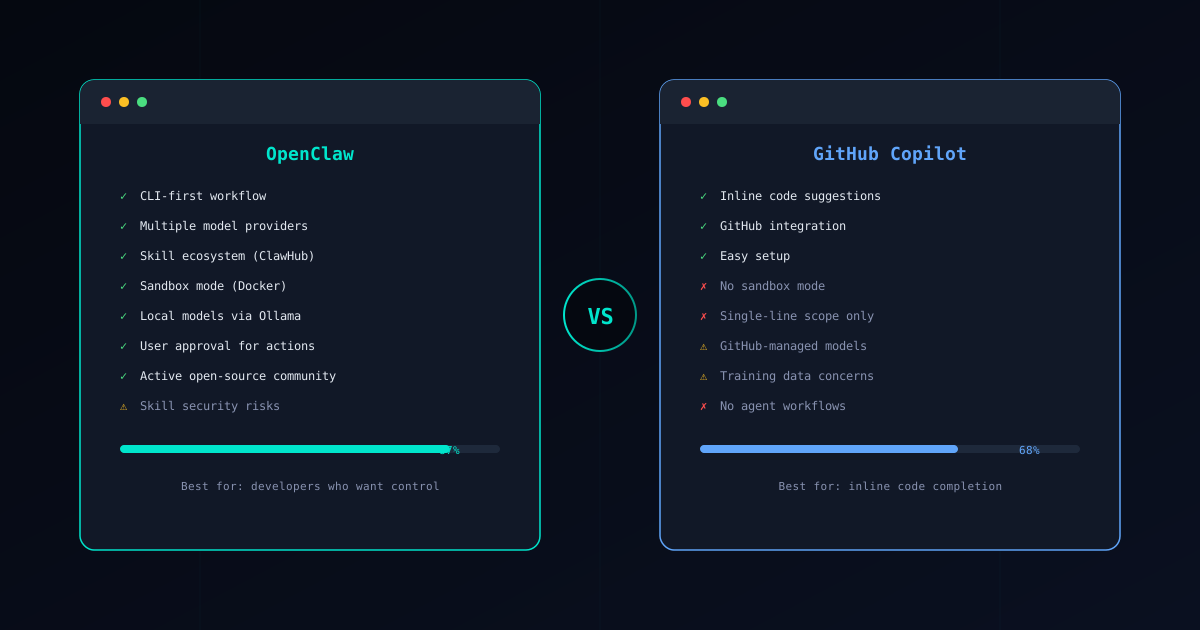
OpenClaw and GitHub Copilot are fundamentally different kinds of tools. Copilot is an inline code suggestion engine that predicts what you are about to type. OpenClaw is a full agent framework that executes multi-step tasks through verified skills inside a sandboxed runtime.
Comparing them directly is a bit like comparing a spell-checker to a ghostwriter. They both involve AI and code, but they operate at completely different levels of abstraction. This guide explains where that difference matters, where each tool excels, and how to think about choosing between them — or using both.
If you are new to OpenClaw, start with our What is OpenClaw? overview first.
Core Philosophy
OpenClaw: “Execute this task end-to-end”
OpenClaw treats AI as a capable agent that can plan, coordinate, and carry out multi-step work. You describe a goal — “scaffold a new API endpoint with tests and database migration” — and OpenClaw breaks it into steps, selects appropriate skills from the Verified Skills catalog, and executes each one with your approval.
The agent understands project context, manages file operations across your codebase, and enforces security boundaries throughout. It is designed for the tasks that are too complex for a single code suggestion — tasks that require coordination, multiple tools, and an understanding of how pieces fit together.
Copilot: “Complete this line of code”
Copilot’s core strength is predicting what comes next as you type. It watches your cursor position, reads surrounding context, and suggests completions ranging from a few characters to entire function bodies. The experience is seamless — you type, suggestions appear, you accept or reject them with a keystroke.
GitHub has expanded Copilot beyond pure autocomplete with Copilot Chat and Copilot Workspace, adding conversational AI and multi-file editing capabilities. But the foundation remains code completion, and the newer features inherit that DNA. Even Copilot Workspace is oriented around generating code patches rather than executing arbitrary tasks.
Feature Comparison
Here is how OpenClaw and Copilot compare across the dimensions that matter most:
| Feature | OpenClaw | GitHub Copilot |
|---|---|---|
| Primary function | Multi-step agent framework | Inline code completion |
| Model choice | Any model via Gateway + Ollama | GitHub-managed (GPT-4o, Claude) |
| Security model | Sandboxed skills, permissions, approval gates | No sandbox, code sent to GitHub servers |
| Task scope | Multi-file, multi-step workflows | Single-file suggestions, limited multi-file via Workspace |
| Open source | Yes, fully open | No, proprietary |
| Cost model | Pay per API token ($0.10-2.00/task) | $10-19/month subscription |
| Extensibility | ClawHub skill marketplace, custom skills | Limited to IDE extension settings |
| Human-in-the-loop | Explicit approval gates before execution | Accept/reject inline suggestions |
The task scope difference is the most important row in this table. Copilot suggests code within the file you are editing. OpenClaw orchestrates work across your entire project — creating files, modifying multiple modules, running tests, and coordinating the results. These are qualitatively different capabilities.
Copilot’s Practical Limitations
Copilot is an excellent autocomplete tool. Millions of developers use it daily and report genuine productivity gains. But its architecture creates limitations that become more visible as your needs grow beyond single-file edits.
Single-Line Scope
Copilot’s suggestions are anchored to your cursor position. It sees the current file and some surrounding context, then predicts what should come next. This works well for writing new functions, filling in boilerplate, and completing patterns the model has seen before.
It does not work well for tasks that span files. “Refactor this service to use the new authentication middleware and update all routes that depend on it” requires understanding multiple files, their relationships, and the order of changes. Copilot cannot orchestrate that kind of work because it fundamentally operates one suggestion at a time.
Copilot Workspace attempts to address this with multi-file editing sessions, but it is still oriented around generating code patches rather than executing arbitrary multi-step workflows. It cannot run your tests, check build output, or iterate based on runtime results.
OpenClaw handles cross-cutting tasks natively. Skills can read multiple files, understand project structure, make coordinated changes, and verify results — all within a single agent session.
No Isolation Model
When Copilot processes your code, it sends context to GitHub’s servers for inference. There is no local processing option for the primary autocomplete feature. This means:
- Your code leaves your machine on every keystroke that triggers a suggestion
- Proprietary code, credentials accidentally left in files, and sensitive business logic all flow through GitHub’s infrastructure
- You rely on GitHub’s privacy commitments, which you cannot independently audit
Copilot does not have any sandboxing for its suggestions. When you accept a suggestion, it is inserted directly into your file with no permission check, no isolation, and no review gate beyond your own judgment.
OpenClaw keeps you in control of where your data goes. You choose the LLM provider, configure the Gateway to route requests to specific endpoints, or run models entirely locally with Ollama. The Docker sandbox isolates skill execution from your host system. The permission model ensures skills can only access what you explicitly approve.
Context Window Limitations
Copilot’s suggestions are limited by how much surrounding code fits in the model’s context window. For large files or complex projects, Copilot may miss important context from other parts of the codebase. It compensates with retrieval-augmented techniques, but the fundamental constraint remains: it sees a window, not the whole picture.
This leads to suggestions that are locally correct but globally wrong — a function that type-checks against the visible imports but does not match the actual API contract defined three directories away. The larger and more interconnected your project, the more often this happens.
OpenClaw’s skill-based approach sidesteps this limitation. Skills are designed to gather the specific context they need from across the project before generating output. A refactoring skill reads all affected files, understands their relationships, and produces coordinated changes. The agent maintains project-level awareness that a line-by-line suggestion engine cannot match.
Training Data Concerns
Copilot’s models were trained on public GitHub repositories, which raised significant legal and ethical questions about code licensing. While GitHub has added filters and attribution features, the fundamental concern remains for developers working on proprietary code: are your accepted suggestions derived from someone else’s copyrighted code?
OpenClaw does not train on your code or anyone else’s. It sends your prompts to the LLM provider you choose, which has its own terms of service that you can evaluate independently. Because OpenClaw is open source, you can audit exactly what data leaves your machine and where it goes.
When Copilot Makes Sense
Copilot is a strong choice for specific workflows where its strengths align with your needs:
- Quick inline suggestions while typing — For the moment-to-moment experience of writing code, Copilot’s inline completions reduce keystrokes and help you stay in flow. No agent framework can match the speed of a suggestion that appears before you finish typing.
- GitHub Enterprise teams — If your organization is already invested in GitHub Enterprise, Copilot integrates seamlessly with your existing infrastructure, permissions, and compliance workflows. The administrative controls for managing Copilot across a team are mature.
- Zero-config AI assistance — Copilot requires almost no setup. Install the extension, sign in, and start coding. There is no Gateway to configure, no skills to install, no sandbox to set up. For developers who want AI help without any infrastructure decisions, Copilot’s managed approach is appealing.
- Learning and exploring — When you are working in an unfamiliar language or library, Copilot’s suggestions serve as real-time documentation. Seeing idiomatic patterns as you type helps you learn faster than reading docs.
The pattern: Copilot excels when the unit of work is a single edit in a single file, and speed matters more than control.
Other Alternatives
Copilot is not the only option for AI-assisted coding:
Cursor is a proprietary AI-powered IDE that goes beyond autocomplete to offer agent-like capabilities within a visual editor. It competes with Copilot on inline suggestions but adds multi-file editing and chat-driven refactoring. See our OpenClaw vs Cursor comparison for a detailed breakdown.
Claude Code is Anthropic’s CLI-based coding agent. Like OpenClaw, it operates from the terminal and can handle multi-step tasks, though with a different architecture for extensibility and security.
Cody by Sourcegraph focuses on codebase-aware AI assistance, using Sourcegraph’s code intelligence to provide context-rich suggestions across large repositories.
For a comprehensive overview of all major AI coding tools, see our Best AI Coding Agents in 2026 roundup.
Security Comparison
Security is where the philosophical difference between these tools has the most practical impact.
OpenClaw’s Security Model
OpenClaw provides defense in depth that you can inspect and verify:
- Skill verification — Every skill in the Verified Skills catalog has been audited for malicious behavior. The Skill Verifier lets you check any skill before installation.
- Sandbox mode — Skills execute inside Docker-based isolation that prevents filesystem access, network exfiltration, and system-level commands. See the Sandbox Setup Guide for configuration details.
- Permission model — Each skill declares what it needs (
fileRead,fileWrite,network,shell), and the user approves or denies those permissions explicitly. - Human approval gates — The agent proposes changes and waits for confirmation before executing. No surprise modifications to your codebase.
For a deep dive into securing your setup, read our OpenClaw Security Guide.
Copilot’s Security Model
Copilot’s security model is trust-based rather than enforcement-based:
- Your code is transmitted to GitHub’s servers for every suggestion request. GitHub’s privacy policy governs how that data is handled, but you cannot independently verify the implementation.
- Accepted suggestions are inserted directly into your code with no isolation or permission check.
- Copilot for Business offers some additional controls (disabling suggestions matching public code, audit logs), but there is no sandboxing of the AI’s outputs.
- Copilot Workspace can create and modify files across your repository with no permission boundary beyond repository-level access.
For teams working with sensitive code — financial systems, healthcare applications, security infrastructure — the lack of isolation and the requirement to send code to external servers are significant concerns. OpenClaw’s local execution option and sandbox model directly address these requirements.
Conclusion
The choice between OpenClaw and Copilot is less “which is better” and more “what kind of AI assistance do you need”:
Choose OpenClaw when you need:
- Multi-step automated workflows that span files and systems
- Sandboxed execution with explicit permission controls
- Freedom to choose any LLM provider or run models locally
- An open-source tool you can audit, customize, and self-host
- Agent-level capabilities for complex development tasks
- Security that goes beyond trust to verifiable enforcement
Choose Copilot when you want:
- Fast inline code suggestions as you type
- Zero-configuration AI assistance in your editor
- Seamless GitHub Enterprise integration
- A managed service with no infrastructure to maintain
The strongest setup for many developers is using both. Let Copilot handle the moment-to-moment typing experience while OpenClaw manages the larger tasks that require planning, coordination, and security boundaries. They occupy different niches and complement each other well.
Ready to add agent capabilities to your workflow? Follow the Installation Guide to set up OpenClaw in about 30 minutes. If security is your top concern, begin with the Sandbox Setup Guide and the OpenClaw Security Guide to harden your environment from day one.