What is OpenClaw? AI Coding Agent Guide
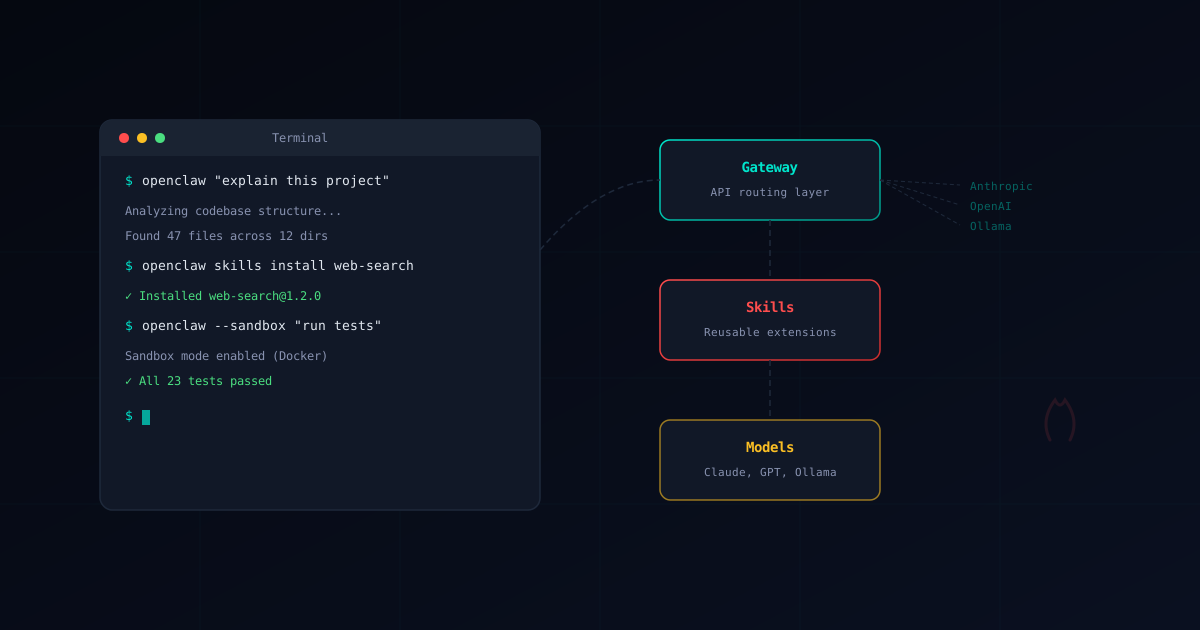
OpenClaw is an open-source AI agent framework with a fast-growing GitHub community. It gives developers a powerful assistant they can run anywhere — in the terminal, browser, or integrated into bots — while keeping control over which models, skills, and configurations they use.
This guide covers everything you need to know to understand OpenClaw’s architecture, capabilities, and security considerations.
OpenClaw Architecture: CLI, Gateway & Skills
OpenClaw is built around three main components: the CLI agent, the Gateway, and the Skill system. Together, they form a flexible platform for AI-assisted development.
The CLI Agent
The primary interface to OpenClaw is a command-line tool that works in your terminal:
# Ask OpenClaw to explain a codebase
openclaw "explain the authentication flow in this project"

# Generate code with context
openclaw "add input validation to the signup form"

# Refactor with instructions
openclaw "refactor this function to use async/await"
The agent reads your project files, understands the codebase structure, and generates contextually accurate responses. It can create, modify, and delete files — always with your approval.
The Gateway
The Gateway is OpenClaw’s API routing layer. It sits between your client and LLM providers, handling:
- Provider routing — Send requests to Anthropic, OpenAI, Google, Ollama, or any OpenAI-compatible API
- Key management — Centralized API key storage and rotation
- Rate limiting — Prevent runaway costs with configurable limits
- Request logging — Full audit trail of all AI interactions
The Gateway is what makes OpenClaw provider-agnostic. You can switch models without changing your workflow.
For detailed setup instructions, see our Gateway Setup Guide.
Skills
Skills are reusable extensions that add capabilities to OpenClaw. They can include prompt templates, tool definitions, file patterns, and lifecycle hooks.
{
  "name": "test-runner",
  "version": "1.0.0",
  "description": "Automatically run and fix failing tests",
  "permissions": {
    "fileSystem": { "read": ["**/*.test.*"], "write": ["**/*.test.*"] },
    "shell": "prompt"
  }
}
ClawHub is the community marketplace where developers publish and discover skills. While most skills are legitimate, the open nature of ClawHub means malicious skills exist. This is why security verification matters.
Browse our Verified Skills catalog for security-audited skills, or use the Skill Verifier to check any skill before installing.
Supported Models
OpenClaw works with a wide range of AI models through its Gateway.
Cloud Providers
| Provider | Models | Best For |
|---|---|---|
| Anthropic | Claude 3.5 Sonnet, Claude 3 Opus | Complex coding tasks, long context |
| OpenAI | GPT-4o, GPT-4 Turbo | General coding, fast responses |
| Gemini 1.5 Pro, Gemini Ultra | Multimodal tasks, large context | |
| OpenRouter | 100+ models | Cost optimization, model variety |
Local Models with Ollama
For maximum privacy and zero API costs, OpenClaw supports local models through Ollama:
| Model | Size | Best For |
|---|---|---|
codellama:34b | 19 GB | General coding tasks |
deepseek-coder:33b | 18 GB | Code generation |
mixtral:8x7b | 26 GB | Complex reasoning |
llama3:70b | 40 GB | Best quality (needs 48 GB+ RAM) |
Running locally means no data leaves your machine — no API keys to protect, no network exfiltration possible. See our Ollama Setup Guide for configuration details.
How People Use OpenClaw
As a CLI Tool
The most common use case is running OpenClaw directly in your terminal. It integrates with your existing workflow:
# Interactive mode
openclaw

# Single task mode
openclaw "fix the type errors in src/utils.ts"

# Pipe input
cat error.log | openclaw "explain these errors and suggest fixes"
In the Browser
OpenClaw offers browser-based options for developers who prefer a visual interface:
- Browser Extension — Adds OpenClaw to your browser’s developer tools panel. Useful for front-end debugging, CSS generation, and DOM analysis.
- Browser Relay — Connects web-based IDEs (like VS Code for the Web or Gitpod) to a local or remote OpenClaw instance.
As Bots
Third-party developers have built OpenClaw-powered bots for messaging platforms:
- Telegram bots — AI coding assistants in group chats
- Discord bots — Code review and help in developer communities
- WhatsApp integrations — Quick code questions on mobile
Popular bots include ClawdBot and MoltBot. These are third-party products — they inherit OpenClaw’s capabilities but also its security risks. Any bot built on OpenClaw can potentially access the skills and permissions granted to it.
Security note: Before using any OpenClaw-based bot, verify what permissions it requires and what skills it has installed. See our Security Guide for bot-specific recommendations.
OpenClaw Sandbox: Isolated Execution
OpenClaw’s sandbox mode runs the agent inside an isolated environment. This is critical for security because it prevents skills from:
- Accessing files outside the workspace
- Making network requests to external servers
- Executing system-level commands
- Reading sensitive data like SSH keys or credentials
See our Sandbox Setup Guide to enable OpenClaw’s built-in tool sandboxing (Docker-based isolation) and reduce the blast radius of untrusted skills.
We strongly recommend enabling sandbox mode for any environment where untrusted skills might be used. See our Sandbox Setup Guide for the complete walkthrough.
Getting Started
1. Install OpenClaw
# Recommended installer
curl -fsSL https://openclaw.ai/install.sh | bash

# Alternative: global install
npm install -g openclaw@latest
# or: pnpm add -g openclaw@latest
For platform-specific instructions (macOS, Linux, Windows WSL, VPS), see the Installation Guide.
2. Configure Your Model Provider
# Set your API key
export ANTHROPIC_API_KEY="sk-ant-..."

# Or use Ollama for local models (no API key needed)
ollama pull codellama:34b
3. Run Your First Task
openclaw "explain this codebase"4. Set Up Security (Recommended)
Before using OpenClaw on production code or with third-party skills:
- Enable Sandbox Mode to isolate skill execution
- Review our Security Guide for hardening strategies
- Protect your Credentials from exposure
- Only install skills from the Verified Skills catalog
Security Considerations
OpenClaw is a powerful tool that executes code on your behalf. This power comes with responsibility:
- Third-party skills can be malicious. ClawHub is an open marketplace. Always verify skills before installation using our Skill Verifier.
- API keys are valuable targets. Skills with network access could exfiltrate your credentials. Use environment variable managers and rotate keys regularly.
- Prompt injection is real. Malicious skills can inject hidden instructions that override your intent. Sandbox mode limits the damage.
- Bot deployments multiply risk. A compromised bot affects all users who interact with it, not just one developer.
Our OpenClaw Security Guide covers these threats in detail with practical mitigation strategies.
Related OpenClaw Guides
- Installation Guide — Step-by-step setup for all platforms
- OpenClaw Security Guide — Comprehensive threat analysis and hardening
- Sandbox Setup — Docker isolation and filesystem restrictions
- Credential Protection — API key and token security
- Ollama Setup — Run AI models locally with full privacy
- Gateway Setup — Configure the API routing layer
- Verified Skills — Security-audited skill catalog
- Skill Verifier — Check any skill before installing