OpenClaw vs Cursor: Open-Source Agent or AI-Powered IDE?
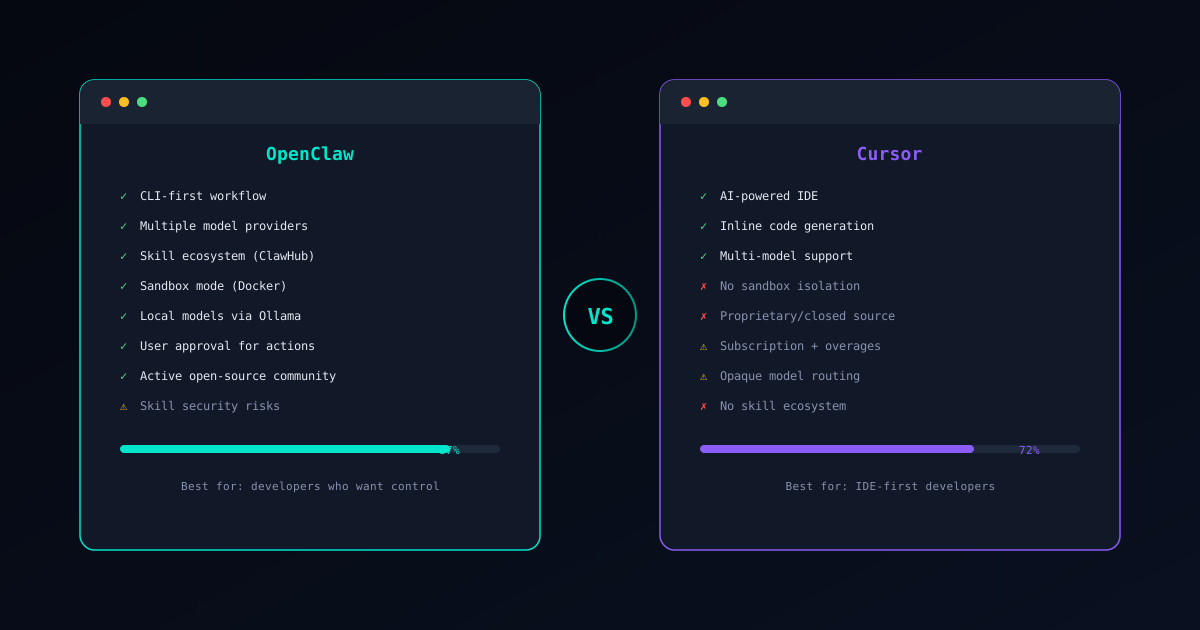
OpenClaw and Cursor solve AI-assisted coding from completely different angles. Cursor is a proprietary AI-powered IDE that wraps intelligence around a visual editor. OpenClaw is an open-source CLI agent framework that executes multi-step tasks through verified skills and a sandboxed runtime.
They are not the same category of tool, which makes the comparison interesting. This guide breaks down where each one shines, where each one falls short, and how to decide which fits your workflow. We will be honest about both.
If you are new to OpenClaw, start with our What is OpenClaw? overview first.
Core Philosophy
OpenClaw: “Give me a task and I will execute it safely”
OpenClaw is built around discrete, auditable actions. You describe a task, OpenClaw selects skills from the Verified Skills catalog, proposes a plan, and waits for your approval before executing. Every skill runs inside a defined permission boundary — file access, network calls, and shell commands are all declared upfront and sandboxed.
The CLI-first design means OpenClaw fits into any environment: local terminals, remote servers, CI/CD pipelines, or embedded inside any editor’s terminal panel. It does not own your editor; it works alongside whatever you already use.
Cursor: “Write code inside an intelligent editor”
Cursor takes a different approach. It forks VS Code and adds AI capabilities directly into the editing experience — inline completions, chat-driven edits, multi-file refactors initiated from the editor UI, and an agent mode that can make changes across your project.
The experience is polished for developers who live inside their IDE. You highlight code, ask a question, and get an inline answer or edit. The AI is woven into the editing surface rather than existing as a separate tool.
This works well until you need to understand exactly what the AI is doing behind the scenes, run tasks outside the editor, or control which model handles which request.
Feature Comparison
Here is how OpenClaw and Cursor compare across the dimensions that matter for daily development work:
| Feature | OpenClaw | Cursor |
|---|---|---|
| Interface | CLI / terminal | Proprietary IDE (VS Code fork) |
| Model choice | Any model via Gateway + Ollama | Cursor-managed routing, limited selection |
| Extension model | Skill-based (ClawHub marketplace) | IDE extensions + built-in AI features |
| Security model | Sandboxed skills, permission declarations, approval gates | No sandbox, runs with user-level access |
| Pricing | Pay per API token ($0.10-2.00/task) | $20/month + overage fees |
| Open source | Yes, fully open | No, proprietary |
| Offline / local | Yes, via Ollama local models | No, requires Cursor servers |
| Customization | Full config, custom skills, self-hosted Gateway | Limited to IDE settings and prompt rules |
The model choice difference deserves emphasis. OpenClaw lets you route any request to any LLM provider through its Gateway, or run models entirely offline with Ollama. Cursor decides which model handles your request based on its own routing logic, and while you can select from a few options, the underlying infrastructure is opaque.
Cursor’s Practical Problems
Cursor is a well-designed product that many developers enjoy. But its architecture introduces four problems that become more visible over time.
Vendor Lock-In
Cursor is a proprietary fork of VS Code. Your AI workflows, custom prompts, and agent configurations live inside Cursor’s ecosystem. If Cursor changes its pricing, discontinues features, or shuts down, you lose those workflows.
This is not hypothetical. Cursor has already changed its pricing tiers and usage limits multiple times since launch. Each change forces users to re-evaluate whether the tool fits their budget.
OpenClaw has no lock-in by design. Skills are portable scripts. Configuration is plain files. The agent framework is open source, so even if the original maintainers stopped working on it tomorrow, the community could fork and continue. Your investment in learning OpenClaw transfers to any environment with a terminal.
No Sandboxing
When Cursor’s AI agent mode edits your files, it operates with the same permissions as your user account. There is no isolation layer between the AI’s actions and your filesystem, environment variables, or credentials.
This means a poorly constructed prompt or a misunderstood instruction can result in the AI modifying files outside the intended scope, reading sensitive configuration, or executing commands you did not anticipate. There is no permission model — the AI either has access or it does not.
OpenClaw’s skill-based architecture addresses this directly. Every skill declares its required permissions (fileRead, fileWrite, network, shell), and the sandbox enforces those boundaries. The Skill Verifier lets you audit any skill before installation, and Docker-based isolation prevents breakout even if a skill misbehaves.
Opaque Model Routing
Cursor routes your requests to different models based on internal logic that users cannot inspect or control. You might think you are using one model, but Cursor may route certain requests to a cheaper or faster alternative without telling you.
This matters for consistency and cost. If you are working on a security-sensitive refactor and Cursor silently routes your request to a less capable model, the output quality drops without explanation. You also cannot optimize costs because you do not fully control which model handles which task.
OpenClaw’s Gateway gives you explicit control. You configure model routing rules yourself — which provider handles which task type, fallback chains, cost limits, and rate controls. Everything is transparent and auditable.
Cost Ceiling with Overages
Cursor’s $20/month subscription includes a usage quota. Exceed that quota and you pay overage fees that can add up quickly during intensive coding sessions. The exact pricing for overages has changed multiple times, making it difficult to predict monthly costs.
For individual developers, $20/month may seem reasonable until an intense project week pushes you into overage territory. For teams, the per-seat subscription compounds — ten developers is $200/month before any overages.
OpenClaw’s pay-per-token model means you pay exactly for what you use. A light week costs pennies. A heavy refactoring session might cost a few dollars. There is no minimum monthly commitment and no surprise overage fees. You can also switch to local models via Ollama for zero marginal cost when working on less complex tasks.
When Cursor Makes Sense
Despite these concerns, Cursor is a genuinely good product for certain workflows:
- Frontend-heavy development — If your work is primarily visual UI code and you benefit from seeing inline AI suggestions as you type HTML, CSS, and component code, Cursor’s integrated experience is hard to beat.
- Teams standardized on a single IDE — When an entire team uses Cursor as their standard editor, the shared context and consistent AI behavior across the team has value, even if it comes with lock-in.
- Quick inline edits — For small, fast changes — “rename this variable,” “add error handling to this function,” “write a docstring” — Cursor’s inline chat is faster than switching to a terminal and invoking an agent.
- Developers who prefer GUI workflows — Not everyone wants a CLI-first tool. If you strongly prefer visual interfaces and rarely use terminals, Cursor’s approach aligns better with how you work.
The key question is whether your primary need is an intelligent editor or an intelligent agent. If you mostly need smarter autocomplete and inline chat, Cursor delivers. If you need multi-step automated workflows, sandboxed execution, and model flexibility, OpenClaw is the stronger choice.
Other Alternatives
Cursor is not the only AI-enhanced development tool worth considering:
GitHub Copilot is the most widely adopted AI coding assistant. It focuses on inline code completion rather than full agent capabilities. Copilot integrates with multiple editors including VS Code, JetBrains, and Neovim. For a detailed breakdown, see our OpenClaw vs Copilot comparison.
Windsurf (formerly Codeium) offers another AI-powered IDE experience with its own take on agent-driven development. It competes directly with Cursor in the proprietary AI IDE space. We cover this matchup in OpenClaw vs Windsurf.
Claude Code is Anthropic’s CLI-based coding agent. It shares OpenClaw’s terminal-first philosophy but takes a different approach to extensibility and security.
For a broader view of the landscape, see our Best AI Coding Agents in 2026 roundup, which compares all major options across reliability, security, cost, and developer experience.
Security Comparison
Security is the clearest differentiator between these two tools.
OpenClaw’s Security Model
OpenClaw provides layered protection that you can verify yourself:
- Skill verification — Every skill in the Verified Skills catalog has been audited for malicious behavior. The Skill Verifier lets you check any skill before installation.
- Sandbox mode — Skills execute inside Docker-based isolation that prevents filesystem access, network exfiltration, and system-level commands. See the Sandbox Setup Guide for configuration details.
- Permission model — Each skill declares what it needs (file access, shell commands, network requests), and the user approves or denies those permissions explicitly.
- Human approval gates — The agent proposes changes and waits for confirmation before executing. No surprise modifications to your codebase.
For a deep dive into securing your setup, read our OpenClaw Security Guide.
Cursor’s Security Model
Cursor operates with the full permissions of your user account. When the AI agent mode is active, it can read any file, write any file, and execute terminal commands — all with the same access you have.
There is no permission declaration system. There is no sandbox. There is no skill verification because Cursor’s AI capabilities are built-in rather than modular. The AI’s actions are bounded only by the context you provide in your prompts and by Cursor’s own safety filters, which are not user-configurable.
Additionally, your code is sent to Cursor’s servers for processing. While Cursor states that it does not train on user code, the proprietary nature of the system means you cannot independently verify this claim. OpenClaw processes everything locally or through API providers you choose and configure yourself.
Conclusion
The choice between OpenClaw and Cursor depends on what kind of AI assistance you actually need:
Choose OpenClaw when you need:
- Multi-step automated workflows across files and systems
- Sandboxed, auditable execution with explicit permissions
- Freedom to use any LLM provider or run models locally
- No vendor lock-in and no monthly subscription
- An open-source tool you can inspect, customize, and self-host
- CI/CD integration and server-side automation
Choose Cursor when you want:
- A polished visual IDE with AI baked into every interaction
- Inline completions and chat without leaving the editor
- A managed experience where model routing is handled for you
- Quick setup with minimal configuration
Many developers end up using both — Cursor for visual editing and inline assistance, OpenClaw for automated multi-step tasks and sandboxed agent workflows. The tools are complementary rather than mutually exclusive.
Ready to try OpenClaw? Follow the Installation Guide to set up OpenClaw in about 30 minutes. If security is your top concern, begin with the Sandbox Setup Guide and the OpenClaw Security Guide to harden your environment from day one.