OpenClaw vs Aider: Which Terminal AI Coding Tool Wins?
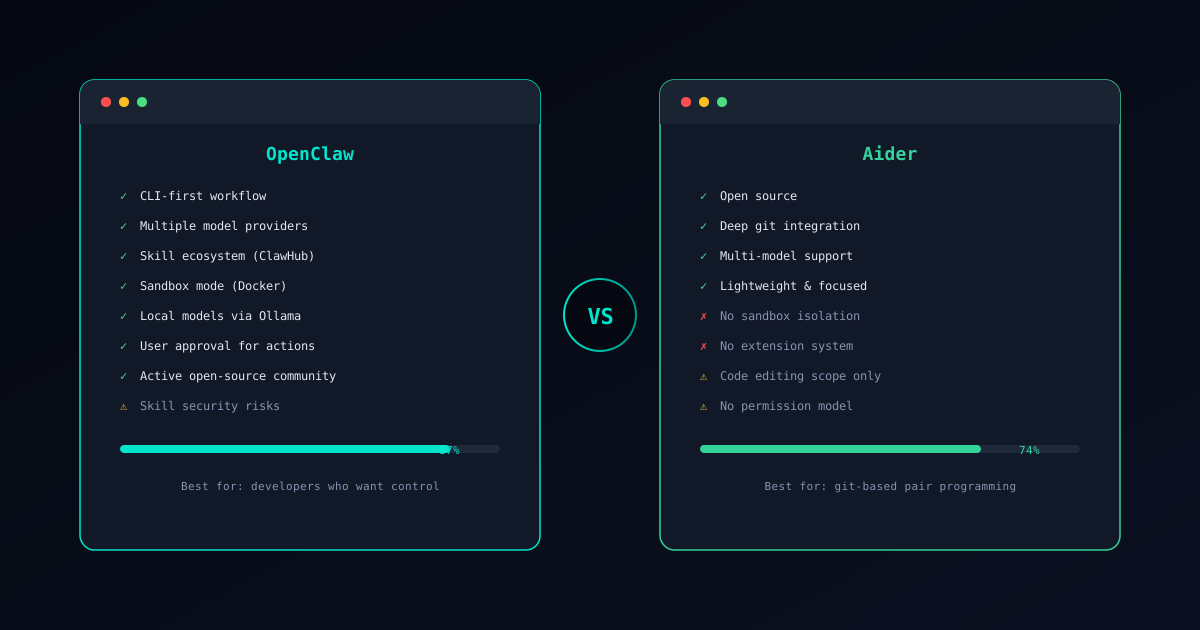
OpenClaw and Aider are both open-source, CLI-first AI coding tools. They both run in your terminal, they both work with multiple LLM providers, and they both aim to make you more productive as a developer. But that is where the similarities end.
Aider is a focused pair-programming tool. It watches your git repository, edits files based on your instructions, and commits changes automatically. It does one thing and does it well. OpenClaw is a full agent framework with a skill ecosystem, Docker sandboxing, a permission model, and workflow orchestration capabilities that extend far beyond code editing.
This guide breaks down where each tool excels and where it falls short, so you can make the right choice for your workflow.
If you are new to OpenClaw, start with our What is OpenClaw? overview first.
Core Philosophy
OpenClaw: “Agent framework for any developer task”
OpenClaw approaches coding assistance as one part of a larger developer workflow. You install skills from the ClawHub marketplace, configure permissions for each skill, and orchestrate multi-step tasks through a single CLI interface. Code editing is a capability, not the entire product.
The architecture is designed for extensibility. When you need something OpenClaw does not do out of the box, you install a skill for it or build your own. The agent coordinates between skills, asks for human approval at critical decision points, and executes inside a sandboxed environment that protects your system from unintended side effects.
Aider: “Your AI pair programmer in the terminal”
Aider is laser-focused on the pair-programming experience. You add files to a chat session, describe the changes you want, and Aider edits those files and creates git commits. The tool has deep integration with git: it understands repository structure, creates meaningful commit messages, and maintains a clean commit history.
This focus is both Aider’s greatest strength and its fundamental limitation. It is exceptionally good at the edit-commit loop. It understands diffs, handles merge conflicts, and supports multiple editing formats optimized for different models. But it does not try to be more than a code editor with a chat interface.
Feature Comparison
Here is how the two tools compare across the dimensions that matter for daily development work:
| Feature | OpenClaw | Aider |
|---|---|---|
| Architecture | Skill-based agent framework | Pair-programming CLI tool |
| Extension system | ClawHub marketplace with 50+ skills | None — features are built-in only |
| Security model | Docker sandbox, permissions, approval gates | No sandboxing or permission model |
| Model support | Any LLM via Gateway + local via Ollama | Multiple providers via direct API config |
| Git integration | Through skills | Deep native integration with auto-commits |
| Cost | $0.10-2.00 per task | Pay per API token (varies by model) |
| Community | Active GitHub with growing ecosystem | Active open-source community |
| Scope | Full workflow orchestration | Code editing and git operations |
The architectural difference is the key takeaway. Aider is a polished, self-contained tool. OpenClaw is a platform you extend with skills. Both approaches have merit, but they serve different needs.
Aider’s Limitations
Aider is a well-built tool that deserves its reputation in the pair-programming space. But its focused scope creates limitations that become apparent as your needs grow.
No Extension System
What you get with Aider is what you get. The tool handles code editing, git commits, and chat-based interaction. If you need to run tests in a sandbox, deploy to staging, lint with custom rules, orchestrate a multi-step refactoring across repositories, or integrate with external services, Aider has no mechanism for adding those capabilities.
OpenClaw’s skill system addresses this directly. Need to run database migrations? Install a skill. Need to generate API documentation? Install a skill. Need to analyze security vulnerabilities? Install a skill. The Verified Skills catalog covers common workflows, and the community continuously adds new skills through ClawHub.
No Sandboxing
Aider runs with full filesystem and shell access. When it edits a file, it writes directly to your working tree. When it runs commands, those commands execute with your user permissions. There is no isolation layer between what the LLM suggests and what happens on your machine.
For experienced developers working on personal projects, this is often fine — you review the diffs, and git gives you an undo mechanism. But for teams, production codebases, or situations where the AI might interact with sensitive files, the lack of any security boundary is a real concern.
OpenClaw’s sandbox mode runs skill execution inside Docker containers. The AI cannot access files outside the project directory, cannot make network requests unless explicitly permitted, and cannot execute arbitrary shell commands. Every action goes through a permission check before execution.
Narrower Scope
Aider excels at the edit-commit loop, but modern development involves more than editing code. Deploying, testing, monitoring, documenting, refactoring across services, managing infrastructure — these are all tasks that developers handle daily. Aider does not attempt to address them.
OpenClaw’s agent architecture is designed for exactly these broader workflows. Skills can chain together, the agent can plan multi-step operations, and the human-in-the-loop model ensures you stay in control as complexity increases. Your CLI tool grows with your needs instead of hitting a ceiling.
No Permission Model
When Aider accesses your repository, it has full read and write access to every file. There is no way to restrict it to specific directories, prevent it from modifying certain file types, or require approval before writes happen. The tool assumes trust between you and the AI output.
OpenClaw’s permission model lets each skill declare exactly what it needs: fileRead, fileWrite, network, shell. You approve or deny those permissions explicitly. A code formatting skill does not need network access, and OpenClaw enforces that boundary. This granular control matters for security-conscious teams and regulated environments.
When Aider Makes Sense
Despite these limitations, Aider is an excellent choice for specific workflows:
- Pure pair programming — If your primary need is chatting with an AI about code changes and having those changes applied cleanly with good commit messages, Aider’s focused design is hard to beat. The edit-commit loop is polished and fast.
- Lightweight focused editing — Aider has minimal setup overhead. Install it, point it at a repo, and start editing. There is no skill installation, no sandbox configuration, no Gateway setup. For quick sessions, this simplicity is valuable.
- Git-centric workflows — Aider’s understanding of git is deeper than any general-purpose agent. It handles multi-file edits as atomic commits, manages context through repository maps, and integrates with your existing branching strategy naturally.
- Existing codebase exploration — Aider’s repository map feature gives the AI awareness of your entire codebase structure, making it effective at navigating and understanding large projects during editing sessions.
The common thread: Aider is best when your task begins and ends with code edits in a git repository. Once your needs extend beyond that boundary, you will want a framework with more reach.
Other Alternatives
Aider is not the only tool in the terminal AI coding space. Several alternatives offer different tradeoffs:
Claude Code is Anthropic’s official CLI agent that combines code editing with broader task capabilities. It shares some of OpenClaw’s agent philosophy but with a different execution model. See our OpenClaw vs Claude Code comparison for a detailed breakdown.
GitHub Copilot operates primarily as an IDE extension with autocomplete and chat features. It targets a different workflow than both OpenClaw and Aider — integrated into the editor rather than the terminal. Read our OpenClaw vs Copilot guide for the full comparison.
For a broader survey of the landscape, our Best AI Coding Agents 2026 guide covers the full range of options and helps you understand where each tool fits.
Security Comparison
Security is the area where the architectural differences between these tools matter most.
OpenClaw’s Security Model
OpenClaw provides layered security controls designed for professional development environments:
- Skill verification — Every skill in the Verified Skills catalog has been audited for malicious behavior. The Skill Verifier lets you check any skill before installation.
- Sandbox mode — Skills execute inside Docker-based isolation that prevents filesystem access, network exfiltration, and system-level commands. See the Sandbox Setup Guide for configuration details.
- Permission model — Each skill declares what it needs (file access, shell commands, network requests), and the user approves or denies those permissions explicitly.
- Human approval gates — The agent proposes changes and waits for confirmation before executing. No surprise modifications to your codebase.
For a deep dive into securing your setup, read our OpenClaw Security Guide.
Aider’s Security Model
Aider operates on a trust-the-user model. It runs with whatever filesystem and shell access the invoking user has. There is no sandboxing, no permission system, and no verification layer for AI-generated actions.
In practice, this means:
- The AI can read and write any file your user account can access
- Shell commands suggested by the AI execute with full user permissions
- There is no isolation between your project files and the rest of your system
- Environment variables, including API keys and credentials, are accessible
Aider mitigates some risk through its git integration — changes are committed, so you can always revert. But prevention is fundamentally different from recovery. A leaked credential or an overwritten configuration file may cause damage that a git revert cannot undo.
This is not a design flaw in Aider — it is a consequence of its focused scope. A pair-programming tool is meant to work closely with your codebase, and adding security layers would slow down the tight edit loop that makes Aider effective. OpenClaw accepts that tradeoff because its broader scope demands it.
Conclusion
The choice between OpenClaw and Aider depends on what you need from a terminal AI coding tool:
Choose OpenClaw when you need:
- A framework that grows with your workflow beyond code editing
- Security controls including sandboxing, permissions, and approval gates
- An extensible skill ecosystem for diverse development tasks
- Multi-model support with Gateway and local model options via Ollama
- An agent that can orchestrate complex, multi-step operations
Choose Aider when you want:
- A focused, fast pair-programming experience in the terminal
- Deep git integration with automatic commits and clean history
- Minimal setup for quick coding sessions
- A lightweight tool that does one thing exceptionally well
Both tools are open-source, both are actively maintained, and both have strong communities. If pair programming is your entire use case, Aider delivers a polished experience. If you need an agent framework that handles pair programming and everything else, OpenClaw is the more capable foundation.
Ready to get started? Follow the Installation Guide to set up OpenClaw in about 30 minutes. If security is your top concern, begin with the Sandbox Setup Guide and the OpenClaw Security Guide to harden your environment from day one.