OpenClaw vs Windsurf: Agent Framework vs AI IDE Fork
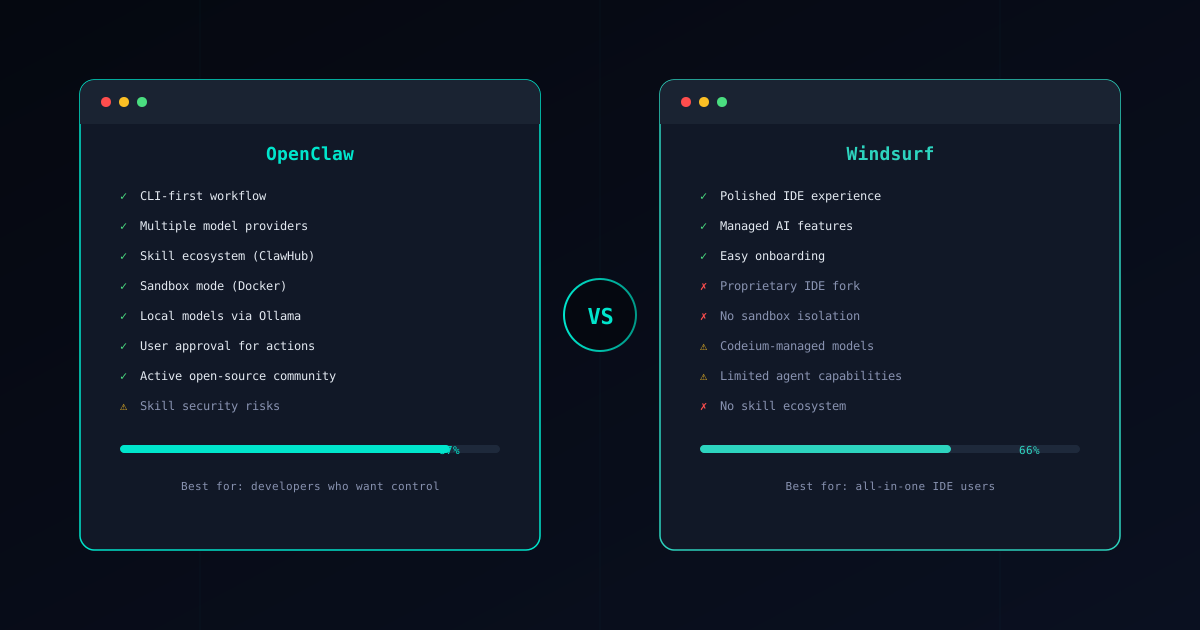
OpenClaw and Windsurf represent two fundamentally different approaches to AI-assisted development. OpenClaw is an open-source CLI agent framework where you install skills, configure permissions, and orchestrate tasks from your terminal. Windsurf is Codeium’s proprietary AI-enhanced IDE — a fork of VS Code with autocomplete, inline chat, and agent features baked directly into the editor.
The choice between them is not really about which is “better.” It is about whether you want an open, extensible agent framework you control, or a polished IDE experience where the AI is managed for you. This guide examines both honestly so you can decide what fits your workflow.
If you are new to OpenClaw, start with our What is OpenClaw? overview first.
Core Philosophy
OpenClaw: “Own your tools, control your models”
OpenClaw is built on the principle that developers should control every layer of their AI tooling. You choose your LLM provider through the Gateway system — OpenAI, Anthropic, Mistral, or any compatible API. You can run models locally through Ollama for fully offline operation. You install skills from the ClawHub marketplace and decide exactly what permissions each skill gets.
The CLI-first design means OpenClaw fits into any workflow. It does not care what editor you use, what operating system you run, or how you structure your projects. It is a tool you invoke, not an environment you live inside.
Windsurf: “AI built into where you work”
Windsurf’s philosophy is that AI should be invisible — woven into the editor so deeply that it feels like a natural extension of your coding environment. Open a file, and Windsurf suggests completions. Highlight code, and inline chat offers refactoring options. Start a task, and the embedded agent works through it in the background.
Codeium manages the model infrastructure behind the scenes. You do not configure API keys, choose model versions, or think about token costs per request. The subscription covers it. This removes friction but also removes control — you use whatever models Codeium decides to serve, with whatever parameters they choose.
Feature Comparison
Here is how the two tools compare across the dimensions that matter most:
| Feature | OpenClaw | Windsurf |
|---|---|---|
| Type | CLI agent framework | AI-enhanced IDE (VS Code fork) |
| Open source | Yes — full codebase on GitHub | No — proprietary, closed-source AI layer |
| Model control | Any provider via Gateway + local via Ollama | Codeium-managed models, limited selection |
| Extension system | ClawHub marketplace with 50+ skills | VS Code extensions + built-in AI features |
| Security | Docker sandbox, permissions, approval gates | No AI sandboxing, workspace-level access |
| Pricing | Pay per API token ($0.10-2.00/task) | Free tier + Pro subscription ($10-40/mo) |
| Offline/local | Full support via Ollama | No — requires Codeium cloud connection |
| Customization | Skills, permissions, model routing, configs | Editor settings + limited AI behavior toggles |
The pricing model difference is worth highlighting. OpenClaw’s pay-per-token model means you pay only for what you use, and costs scale linearly with usage. Windsurf’s subscription gives you a predictable monthly bill but limits what you can do within each tier — heavier usage pushes you to more expensive plans, and you have no visibility into the actual compute costs behind your subscription.
Windsurf’s Limitations
Windsurf is a capable product that serves its target audience well. But its design creates constraints that matter for developers who value openness, control, and security.
IDE Lock-in
Windsurf is a VS Code fork. If you use it, you use Codeium’s editor. While it maintains compatibility with most VS Code extensions, it is still a proprietary fork maintained by a single company. Your AI-assisted workflow becomes tied to their product decisions, their release cadence, and their business model.
If Codeium changes pricing, deprecates features, or pivots their product strategy, your workflow changes with it. The history of proprietary developer tools is full of acquisitions, shutdowns, and breaking changes that left users scrambling.
OpenClaw is editor-agnostic. Use it with VS Code, Neovim, Emacs, JetBrains, or any other editor. Your agent framework and your editor are independent choices. If you switch editors tomorrow, OpenClaw works exactly the same way.
Limited Agent Capabilities
Windsurf’s AI features center on what makes sense inside an IDE: autocomplete, inline chat, code explanation, and basic refactoring assistance. These are valuable daily features, but they do not constitute a full agent framework.
You cannot install new AI capabilities into Windsurf. You cannot chain operations into multi-step workflows. You cannot define custom permission boundaries for different AI actions. The AI does what Codeium built it to do, and nothing more.
OpenClaw’s skill architecture means the agent’s capabilities are limited only by what skills exist. The ClawHub marketplace provides verified skills for common tasks, and the open-source community continuously builds new ones. Need a capability that does not exist? Write a skill and publish it.
No Sandboxing for AI Actions
When Windsurf’s AI edits a file, runs a terminal command, or suggests a refactoring, those actions execute with full workspace access. There is no isolation layer between the AI’s suggestions and your filesystem. The AI agent within Windsurf can read any file in your workspace, write to any location, and execute terminal commands without granular permission checks.
For individual developers working on personal projects, this may be acceptable. For teams working on production code, codebases with secrets, or regulated environments, the lack of sandboxing is a meaningful gap.
OpenClaw’s sandbox mode isolates skill execution inside Docker containers. Each skill declares the permissions it needs — fileRead, fileWrite, network, shell — and you approve or deny them explicitly. The AI cannot access what you have not authorized.
Opaque Model Management
Windsurf routes all AI interactions through Codeium’s cloud infrastructure. You do not know which specific model version is handling your request, what data retention policies apply to your code, or how your prompts are used for model improvement. Codeium publishes privacy policies, but the technical implementation is a black box.
For open-source projects this may be fine. For proprietary codebases, especially in industries with compliance requirements, sending every code interaction through a third-party cloud service raises legitimate concerns.
OpenClaw gives you full model transparency. You choose the provider, you configure the connection, and you can inspect every API call. With Ollama integration, you can run models entirely on your own hardware — your code never leaves your machine.
When Windsurf Makes Sense
Despite these limitations, Windsurf is a strong choice for certain developers and teams:
- All-in-one IDE preference — If you want AI capabilities built directly into your editor without configuring anything, Windsurf delivers a polished, integrated experience. Open the editor and start coding with AI assistance immediately.
- GUI over CLI — Not every developer wants to work from the terminal. Windsurf’s visual interface for AI interactions — inline suggestions, chat panels, visual diffs — is more approachable for developers who prefer graphical workflows.
- Teams already using Codeium — If your organization already uses Codeium’s autocomplete extensions, Windsurf is a natural upgrade. The team licensing, shared configurations, and consistent experience across developers simplify adoption.
- Predictable subscription billing — For teams that prefer fixed monthly costs over variable token-based pricing, Windsurf’s subscription model simplifies budgeting even if it costs more at lower usage levels.
The common thread: Windsurf is best for developers who want a managed, integrated AI coding experience and are comfortable trading control for convenience.
Other Alternatives
Windsurf is not the only AI-enhanced IDE option, and OpenClaw is not the only open-source agent framework. Here are other tools worth considering:
Cursor is another AI-enhanced editor, also built as a VS Code fork. It offers similar IDE-integrated AI features with a different model selection and pricing structure. Like Windsurf, it is proprietary and ties your workflow to a specific editor. See our OpenClaw vs Cursor comparison for details.
GitHub Copilot takes a different approach as an extension that works within existing editors rather than forking them. It provides autocomplete and chat across VS Code, JetBrains, and Neovim. Read our OpenClaw vs Copilot guide for the full breakdown.
For a comprehensive look at all the options in this space, our OpenClaw Alternatives guide covers the full landscape and helps you understand the tradeoffs between frameworks, IDE tools, and standalone agents.
Security Comparison
Security is where the philosophical differences between these tools become most consequential.
OpenClaw’s Security Model
OpenClaw provides defense-in-depth security designed for professional and enterprise environments:
- Skill verification — Every skill in the Verified Skills catalog has been audited for malicious behavior. The Skill Verifier lets you check any skill before installation.
- Sandbox mode — Skills execute inside Docker-based isolation that prevents filesystem access, network exfiltration, and system-level commands. See the Sandbox Setup Guide for configuration details.
- Permission model — Each skill declares what it needs (file access, shell commands, network requests), and the user approves or denies those permissions explicitly.
- Human approval gates — The agent proposes changes and waits for confirmation before executing. No surprise modifications to your codebase.
- Local execution — With Ollama, your code and prompts never leave your machine. No third-party cloud dependency required.
For a deep dive into securing your setup, read our OpenClaw Security Guide.
Windsurf’s Security Model
Windsurf operates as a trusted IDE with cloud-connected AI features. The security model relies on:
- Codeium’s infrastructure handling your code interactions
- Workspace-level access controls (the AI sees everything in your open workspace)
- Codeium’s published privacy and data handling policies
- Standard VS Code extension sandboxing for third-party extensions (but not for Codeium’s own AI layer)
There is no option to sandbox AI-initiated file operations, no granular permission model for different AI actions, and no way to run the AI features without connecting to Codeium’s cloud. For individual developers and open-source work, this is generally acceptable. For teams handling sensitive codebases, regulated data, or proprietary algorithms, the lack of local execution and AI sandboxing creates compliance challenges.
Conclusion
The choice between OpenClaw and Windsurf reflects a broader question about how you want AI integrated into your development workflow:
Choose OpenClaw when you need:
- Full control over models, providers, and AI behavior
- Security controls including sandboxing, permissions, and approval gates
- An extensible skill ecosystem that grows with your needs
- Editor independence — use any editor alongside your agent
- Local and offline operation for sensitive codebases
- Open-source transparency and community governance
Choose Windsurf when you want:
- A polished, all-in-one IDE with AI built in
- Managed AI infrastructure without configuration overhead
- Visual, GUI-based AI interactions within the editor
- Predictable subscription pricing for team budgets
- A smooth onboarding experience with minimal setup
Both tools make developers more productive. Windsurf optimizes for immediate, in-editor AI assistance. OpenClaw optimizes for long-term flexibility, security, and the ability to automate workflows that extend beyond code editing. They can even complement each other — use Windsurf as your editor and OpenClaw as your terminal agent for tasks that require broader orchestration.
Ready to get started? Follow the Installation Guide to set up OpenClaw in about 30 minutes. If security is your top concern, begin with the Sandbox Setup Guide and the OpenClaw Security Guide to harden your environment from day one.