OpenClaw vs LangChain: Ready-Made Agent vs Build-Your-Own Toolkit
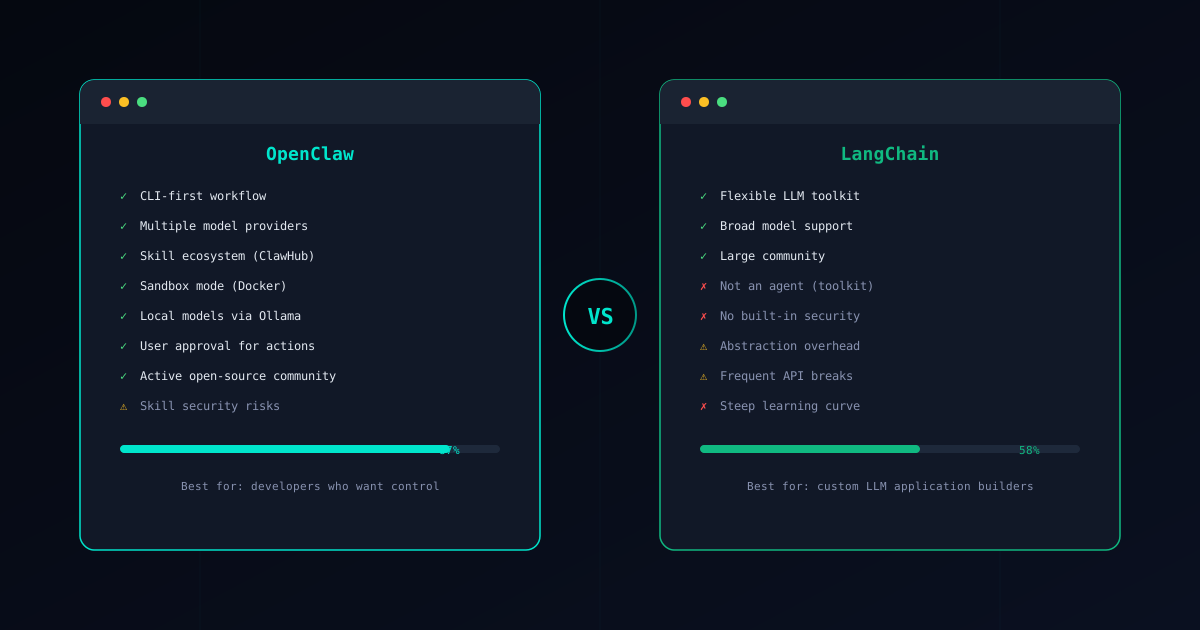
OpenClaw and LangChain exist at different layers of the AI stack. OpenClaw is a product — an AI coding agent you install and start using. LangChain is a toolkit — a collection of components you use to build your own LLM-powered applications.
Comparing them directly is a bit like comparing a car to an engine manufacturer’s catalog. One gets you where you need to go. The other gives you the parts to build whatever vehicle you want, provided you have the time and expertise. This guide lays out the comparison honestly so you can figure out which layer you actually need.
If you are new to OpenClaw, start with our What is OpenClaw? overview first.
Core Philosophy
OpenClaw: Install It, Use It
OpenClaw is a CLI-first AI coding agent built around a skill-based architecture. You install it, configure your preferred LLM provider through the Gateway, and start giving it tasks. Skills from the ClawHub marketplace handle specific capabilities — code generation, refactoring, testing, deployment — and each skill has been verified for safety and reliability.
The key design principle is that you should not have to build anything. The agent works out of the box. The skill ecosystem handles extensibility. The permission model and sandbox handle security. Your job is to describe what you need done, review the agent’s plan, and approve execution.
LangChain: Assemble Your Own
LangChain is a Python (and JavaScript) framework that provides building blocks for LLM applications. It offers abstractions for prompts, chains, agents, memory, document loaders, vector stores, output parsers, and dozens of other components. You choose the pieces you need, wire them together, and build your application.
LangChain’s power is in its breadth. It supports virtually every LLM provider, every vector database, every document format. It provides agent architectures (ReAct, Plan-and-Execute, OpenAI functions) that you can customize to your needs. The framework is a genuine Swiss Army knife for LLM development.
But a Swiss Army knife is not a finished tool. It is a collection of tools that requires you to decide which blade to use, how to hold it, and what to cut. LangChain gives you everything you need to build an AI agent, but it does not give you the agent itself.
Feature Comparison
Here is how the two compare across the dimensions that matter in practice:
| Feature | OpenClaw | LangChain |
|---|---|---|
| Type | Ready-to-use CLI agent | LLM application development toolkit |
| Time to first task | ~30 minutes | Days to weeks |
| Target user | Developers who need an AI coding assistant | Developers building LLM applications |
| Security | Sandbox + permissions + skill verification | You build your own security |
| Maintenance | Skills updated by community | You maintain your entire stack |
| Model support | Multi-model via Gateway + Ollama for local | Broad provider support via integrations |
| Extension model | Install skills from ClawHub | Write Python code, add components |
| Learning curve | Learn the CLI, browse skills | Learn the framework, its abstractions, and their interactions |
The time-to-first-task row captures the fundamental difference. With OpenClaw, you are accomplishing work within an hour of installation. With LangChain, you are writing Python code to define your chains, configure your models, set up memory, handle errors, and test the pipeline. The first productive output is days away at minimum.
LangChain’s Fundamental Problems
LangChain has become one of the most widely used LLM frameworks, and for good reason — it filled a genuine gap when LLM application development was new. But as the ecosystem has matured, several structural problems have become clear.
Abstraction Overhead
LangChain wraps everything in layers of abstraction. A simple LLM call goes through a chain, which uses a prompt template, which may involve an output parser, which feeds into the next chain. Each layer adds indirection that makes it harder to understand what is actually happening.
When things work, the abstractions are invisible. When things break — and they will — you are debugging through multiple layers of framework code to find where your prompt went wrong, where the parser failed, or where the chain passed unexpected data. Stack traces become long and opaque.
OpenClaw’s architecture is flatter by design. A skill does one thing. When it fails, you know which skill failed and why. There is no chain of abstractions to unwind because each skill is a self-contained operation with clear inputs and outputs.
You Build Everything Including Security
LangChain provides no built-in security model. If you build an agent with LangChain that has access to your filesystem, there are no permission gates. If your agent can execute shell commands, there is no sandbox. If you use a community tool or integration, there is no verification system to check it first.
Security is entirely your responsibility. You need to implement your own permission checks, sandboxing, input validation, and output filtering. This is feasible for experienced teams, but it is also error-prone — every custom security implementation is a potential attack surface.
OpenClaw treats security as a first-class feature, not an afterthought. The permission model, sandbox mode, and skill verification exist because these are problems that every user faces, and solving them once in the framework is better than having every user solve them independently.
Frequent Breaking API Changes
LangChain’s API has changed significantly across versions, sometimes multiple times within a single major release cycle. Chains that worked in one version may need rewriting in the next. Import paths change, class hierarchies shift, and deprecation warnings pile up.
For a toolkit that asks you to build your application on top of it, API instability is a serious problem. It means your maintenance burden is not just your own code but also the framework’s evolution. Teams have reported spending more time migrating between LangChain versions than building new features.
OpenClaw’s skill-based approach insulates you from this. Skills are maintained by their authors and the community, and the core CLI provides a stable interface. When the underlying framework evolves, the skills are updated to match — you do not rewrite your workflow.
Not an Agent
This is the most important distinction: LangChain is not an agent. It is a toolkit that lets you build agent-like systems. If you install LangChain expecting to hand it a coding task and get results, you will be disappointed. You will get a collection of Python modules that need assembly, configuration, and custom code before they do anything.
The “agents” in LangChain are architectural patterns — ReAct loops, plan-and-execute chains — that you instantiate and configure. They are starting points, not finished products. You still need to define what tools the agent can use, how it handles errors, when it stops, and how it reports results.
OpenClaw is the finished product. The agent architecture, the tool ecosystem, the error handling, the human-in-the-loop flow — all of it is built, tested, and ready to use.
When LangChain Makes Sense
LangChain is a powerful framework for the right situations:
- Building custom LLM applications — If you are creating a chatbot, a RAG pipeline, a document processing system, or any LLM-powered application that is not specifically a coding agent, LangChain provides the components you need.
- Teams needing fine-grained pipeline control — If you need to control exactly how prompts are constructed, how context is managed, how outputs are parsed, and how chains interact, LangChain gives you that granularity.
- Production apps with specific orchestration requirements — When your application has unique orchestration needs that do not fit any pre-built agent’s workflow, LangChain lets you build exactly the pipeline you need.
- Integrating multiple data sources and models — LangChain’s breadth of integrations (vector stores, document loaders, model providers) makes it valuable when your application needs to connect many different systems.
The common thread: LangChain makes sense when you are building an LLM application and need low-level control. It does not make sense when you need an AI coding agent and want to start working today.
Other Alternatives
LangChain is not the only option if you need something between a ready-made agent and a raw toolkit:
CrewAI sits between OpenClaw and LangChain on the abstraction scale. It gives you a framework for building multi-agent systems with predefined roles and collaboration patterns — more structured than LangChain agents but still requiring Python development. See our OpenClaw vs CrewAI comparison for details.
Devin takes the opposite approach from LangChain — it is a fully autonomous AI coding agent with a cloud-based IDE. It provides even less control than OpenClaw but requires zero setup. See our OpenClaw vs Devin comparison for details.
For a broader overview of the AI coding agent landscape, see our Best AI Coding Agents 2026 guide.
Security Comparison
Security illustrates the product-versus-toolkit distinction clearly.
OpenClaw’s Security Model
OpenClaw provides multiple layers of protection out of the box:
- Skill verification — Every skill in the Verified Skills catalog has been audited for malicious behavior. The Skill Verifier lets you check any skill before installation.
- Sandbox mode — Skills execute inside Docker-based isolation that prevents filesystem access, network exfiltration, and system-level commands. See the Sandbox Setup Guide for configuration details.
- Permission model — Each skill declares what it needs (fileRead, fileWrite, network, shell), and you approve or deny those permissions explicitly.
- Human approval gates — The agent proposes changes and waits for confirmation before executing. No surprise modifications to your codebase.
For a deep dive into securing your setup, read our OpenClaw Security Guide.
LangChain’s Security Model
LangChain does not have a security model. It is a toolkit, and security is the responsibility of whoever builds the application. This means:
- No sandboxing for tools or agents
- No permission declarations or approval gates
- No verification system for community integrations
- No isolation between components
You can build all of these yourself. Wrap tool calls in permission checks. Run your application in a container. Add human-in-the-loop steps to your chains. Audit community integrations before using them. But every line of that security code is yours to write, test, and maintain.
For teams with security expertise, this is workable. For individual developers or small teams, it is a significant burden — and a common source of vulnerabilities. The history of LLM application security incidents shows that “build your own security” often means “ship without security.”
OpenClaw’s approach of building security into the framework protects users who might not have the expertise or time to implement their own security layer.
Conclusion
The choice between OpenClaw and LangChain is really about what layer of the stack you need:
Choose OpenClaw when you need:
- An AI coding agent that works today
- Built-in security without custom development
- A maintained ecosystem of verified skills
- Predictable costs and human oversight
- To spend your time on your project, not on building agent infrastructure
Choose LangChain when you need:
- To build a custom LLM application from components
- Low-level control over prompts, chains, and orchestration
- Broad integrations with data sources and model providers
- A foundation for applications that are not coding agents
- Maximum flexibility at the cost of development time
Both are legitimate tools for their respective use cases. The mistake is choosing LangChain when you need an agent (you will spend weeks building what OpenClaw provides) or choosing OpenClaw when you need a custom LLM application (you will hit the limits of a skill-based architecture). Be honest about which problem you have, and the right choice is straightforward.
Ready to get started? Follow the Installation Guide to set up OpenClaw in about 30 minutes. If security is your top concern, begin with the Sandbox Setup Guide and the OpenClaw Security Guide to harden your environment from day one.