Run OpenClaw for $0: Free Model Setup Guide (Kimi K2.5, Qwen, GLM)
You’re paying $200/month for AI APIs. Your agent runs for three hours before you shut it off because the token costs are bleeding you dry.
Meanwhile, developers are running OpenClaw bots 24/7 for the cost of two coffees — or nothing at all.
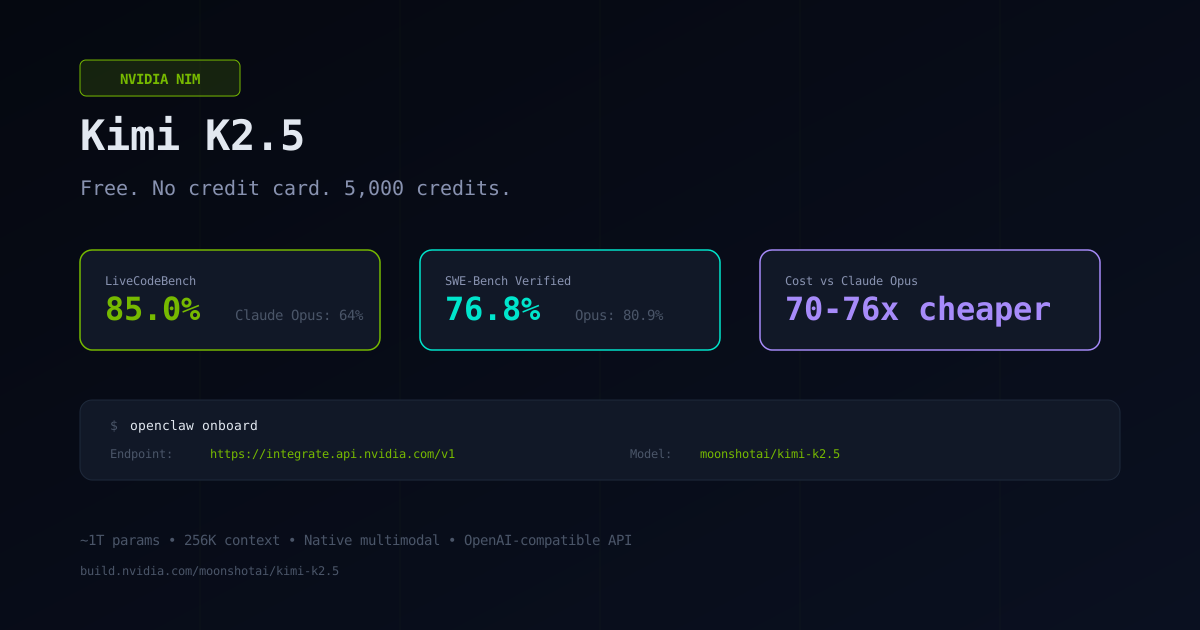
Kimi K2.5 through NVIDIA NIM is completely free. No credit card. 5,000 inference credits. And it scores 85% on LiveCodeBench — higher than Claude Opus at 64%.
Here’s exactly how to set it up, what free alternatives exist, and how to run a near-zero-cost AI agent.
What Is Kimi K2.5
Kimi K2.5 is an open-source multimodal model from Moonshot AI. Roughly one trillion parameters. 256K context window. NVIDIA launched GPU-accelerated endpoints for it on February 4, 2026, making it available for free through their NIM platform.
The benchmarks tell the story:
| Benchmark | Kimi K2.5 | Claude Opus 4.5 | GPT-5.2 |
|---|---|---|---|
| SWE-Bench Verified | 76.8% | 80.9% | 80.0% |
| LiveCodeBench | 85.0% | 64.0% | — |
It trails Claude Opus by about 4 points on SWE-Bench but significantly outperforms it on LiveCodeBench. The cost difference is 70-76x cheaper per token. Through NVIDIA NIM — zero.
The multimodal angle is real too. Feed it a Figma mockup and it generates the corresponding React or Vue code. No separate vision API call. It’s native.
Setup in 5 Minutes
If you haven’t installed OpenClaw yet, start with our Installation Guide.
Step 1. Go to build.nvidia.com. Create an account. Navigate to the Kimi K2.5 model page. Click “Get API Key” then “Generate Key.” You’ll get a key that looks like nvapi-xxx-xxxxxxxx...
Step 2. On your machine or server, run:
openclaw onboardPick “Custom / OpenAI-compatible” as your provider.
Step 3. Enter these values:
Endpoint: https://integrate.api.nvidia.com/v1
Model: moonshotai/kimi-k2.5
API Key: [your nvapi key]
That’s it. Your agent is running on a trillion-parameter model for $0.
Free Tier Limits — Honestly
What you get for free:
- 5,000 credits (one credit equals roughly one inference call)
- 40 requests per minute
- No credit card required
- OpenAI-compatible API format — works with any tool that speaks OpenAI
This is enough for a personal assistant you use throughout the day. It’s enough for development and testing. It’s enough to learn how OpenClaw works without burning money.
It is not enough for a 24/7 heavy-use bot. You’ll burn through 5,000 credits in days if the agent is always active. For that, read the $14/month setup below.
Every Free Model That Works with OpenClaw Right Now
Kimi K2.5 isn’t your only option. Here’s the full landscape of free models you can plug into OpenClaw today.
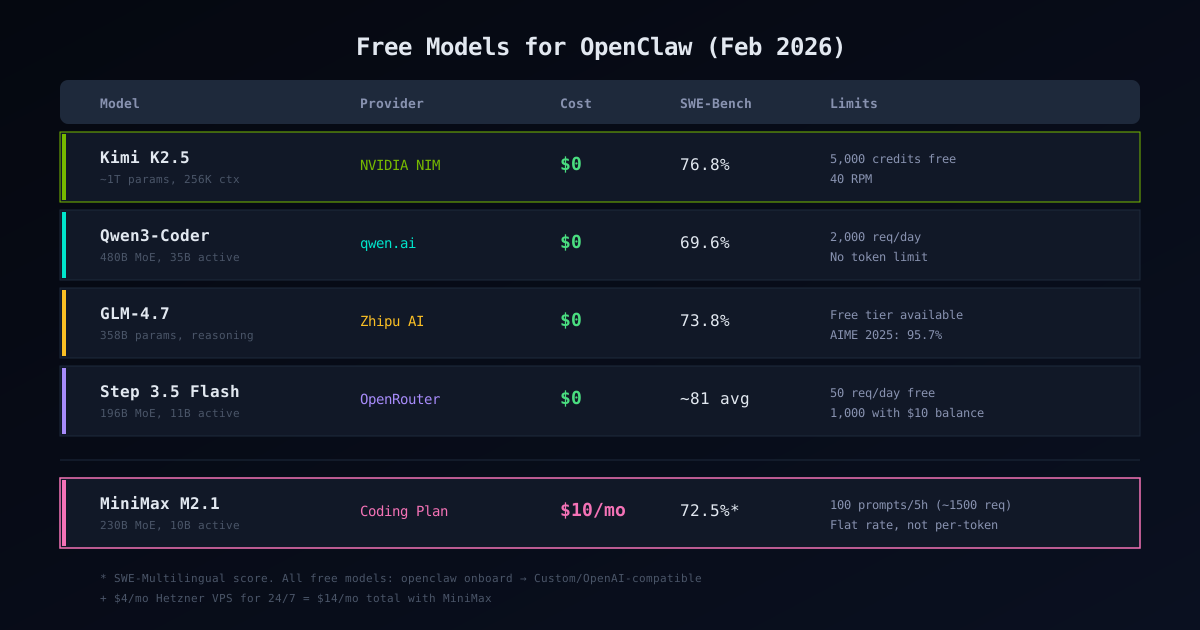
Kimi K2.5 — NVIDIA NIM — $0 SWE-Bench 76.8%. 5,000 free credits, 40 RPM. Best free option for coding tasks. Native multimodal.
Qwen3-Coder — qwen.ai or OpenRouter :free — $0
SWE-Bench 69.6%. Up to 2,000 requests per day with no token limits. Login with Gmail. The Qwen Vision model works too — just run openclaw onboard and switch.
Step 3.5 Flash — OpenRouter :free — $0 Average benchmark score 81.0 — comparable to Kimi K2.5. Sparse MoE: 196B total parameters but only 11B activated per token, so it’s fast. The catch: OpenRouter’s free tier gives you 200 requests per day, bumped to 1,000 if you maintain a $10 account balance. No credit card required to sign up.
GLM-4.7-Flash — Z.AI (Zhipu AI) — $0 (with caveats) The lightweight version of GLM-4.7. Free tier exists on Z.AI’s own platform (api.z.ai) with 1 concurrent request. The full GLM-4.7 is not free anywhere. Limits are poorly documented and shift frequently — treat this as experimental. Strong on reasoning and math if you can get stable access.
All of these work the same way: openclaw onboard → pick Custom/OpenAI-compatible → enter the endpoint and model name.
If you want to run models fully locally with no API dependency at all, see our Ollama Setup Guide.
The $14/Month Always-On Setup
If free limits aren’t enough and you want 24/7 uptime:
MiniMax M2.1 Coding Plan: $10/month — flat rate, not per-token. 100 prompts per 5-hour rolling window (one prompt equals roughly 15 API requests, so about 1,500 effective calls per cycle). SWE-Multilingual: 72.5% — beats Claude Sonnet 4.5 at 68.0%.
Hetzner VPS: $4/month — CX23 or CAX11 ARM. 2 CPU, 4GB RAM, 20TB traffic. More than enough for OpenClaw.
Total: $14/month for a functional AI agent that never sleeps.
The Coding Plan key is separate from MiniMax’s regular pay-as-you-go key — don’t mix them up. Get it at platform.minimax.io/subscribe/coding-plan.
The Smart Setup: Two Brains
The most cost-effective approach isn’t picking one model. It’s using two.
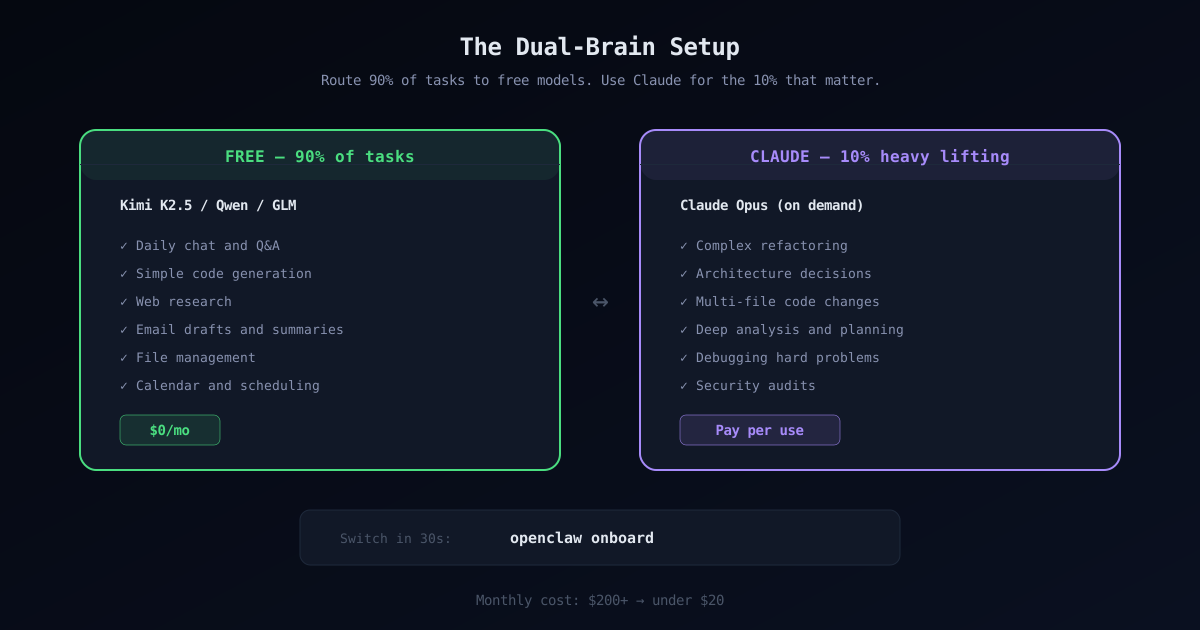
Routine tasks — chat, simple queries, daily automation: run them through Kimi K2.5 or Qwen. Free.
Heavy lifting — complex refactoring, architecture decisions, deep analysis: route those to Claude Opus. On demand.
Switching takes 30 seconds:
openclaw onboard90% of tasks go to the free model. Claude handles the 10% that actually need it. Monthly cost drops from $200+ to under $20.
One Thing: Security
Your OpenClaw agent has access to your files, terminal, and browser. When you start installing community skills from ClawHub — and you will — keep in mind that not all of them are safe.
Before installing anything, run it through our Skill Verifier — it checks skills for suspicious patterns, permissions, and known threats. Takes 5 seconds.
For audited security skills (credential scanning, prompt injection protection, runtime monitoring), check Verified Skills — Security.
And if you’re running an always-on agent on a VPS, skim through our OpenClaw Security Guide first. It covers sandboxing, credential protection, and the common attack vectors. See also: Sandbox Setup and Credential Protection.
Summary
- build.nvidia.com → sign up → get free Kimi K2.5 API key
openclaw onboard→ Custom endpoint →https://integrate.api.nvidia.com/v1- Alternatives: Qwen3-Coder (2K req/day free), Step 3.5 Flash (200 req/day free)
- Need 24/7: MiniMax $10 + Hetzner $4 = $14/month
- Best setup: free model for routine + Claude for heavy lifting
Before installing skills: use our Verifier to check, browse Verified Skills for audited ones.